Omniwithdrawals
 Early Payouts
 Crypto Wallets
 Advances
 Express
 vIBAN
vIBAN Music
Music Facebook distribution
 Team Finance
 Webmon
 YouTube Playables
 Viral Music
 Influencer marketing
 Affiliate program
 About Us
 Services
 Security
 Finances
 Careers
 Blog
Blog
Content creation has long since become more than just a hobby. It is now a full-fledged profession. And as income from social media grows, so does competition. Today, every second user of TikTok or YouTube calls themselves a UGC creator, content creator, etc. How can you win the race for user attention when there are so many creators? This is where AI comes in — an effective friend for quickly generating and processing content. In this article, we will share with you a selection of our favorite AI tools, common mistakes when using AI, and the future of content creators in the coming years. What are we waiting for? Let’s get started!
Integration of AI in the Creator Economy
AI is no longer just a trendy gimmick. It is a working tool that helps reduce content creation time and generate unusual photos, videos, and texts. We are not exaggerating when we say that AI has literally wedged itself into all stages of content production: from creating an idea to editing and finalizing the finished product. Why is AI needed in marketing? What is the future of content creation using AI tools? Let’s see.
AI in Development of Digital Content
A couple of years ago, AI for content creation was seen as a joke or a tool for creating videos along the lines of “machines will never replace humans and their work,” but now everything is different. AI is developing so quickly and decisively that it is now difficult to find someone who does not use it for work. It would seem that creativity and AI are incompatible. We believe the opposite: at the very least, AI helps to sort out ideas for content at the initial stage and implement any idea in the shortest possible time.
In the past, content creation required a large team: a screenwriter, editor, designer, SEO specialist, and analyst. Today, creators can do all of this on their own with the support of AI tools. Most importantly, AI helps turn one video into several pieces of content. To sum up, AI has a positive impact on content creation and helps creators advance faster on social media.
AI — a Trend or a New Marketing Tool?
Whereas AI was previously considered a kind of “experiment” in content creation, it can now be regarded as a fully-fledged marketing tool. According to data from Linkedin, more than 78% of marketing teams use AI tools for content creation or optimization. Is this a good thing?
On the one hand, it speeds up work and allows for increased productivity of each employee and the company as a whole. On the other hand, AI still does not work 100% perfectly. Not every employee is conscientious and double-checks the results of what AI has done. This can become a source of reputational crisis for the creator and other less severe situations.
What if the creator works alone? How often do creators use AI? According to a study by Digiday for March-April 2025, more than 83% of creators already use AI to create content. We could, of course, show more statistics to prove that AI is an effective tool for content creators. In fact, it’s obvious: those who systematically integrate AI into their work grow their channel faster. Those who believe that AI replaces creators rather than enhancing their creative potential lag behind in terms of likes, views, and overall engagement.
Why Creators Use AI: Key Challenges AI Helps to Solve
In the previous section, we established that AI is not just a “toy” for creating weird videos, but a fully-fledged marketing tool. But how does AI and its tools actually help creators? Let’s take a closer look in this chapter.
Content Overload: Planning and Production
Let’s agree: social media algorithms and rules have indeed changed. Whereas previously one large-scale video per month was enough for success and channel growth, now viewers demand frequent, high-quality content. After all, if one creator rarely releases videos, there will always be a replacement. It sounds harsh, but that’s how it is.
AI helps speed up video production at all stages: generating ideas, creating full-fledged content plans, and automating video production. Obviously, AI has its advantages. The question remains: are you ready to entrust part of the creative process to AI, or is delegating not your thing?
Competition for Attention: Generating Ideas and A/B Tests
Is AI often associated with “copy-paste”? What if we look at this issue from a different angle? There are millions of sources of information on the internet. The more sources a creator uses, the more accurate and informative the video will be. Obviously, a person cannot analyze such a large amount of information on their own. AI can do this in seconds and speed up content production.
Moreover, AI tools can help conduct A/B testing of thumbnails, titles, and video descriptions. This way, the creator will immediately see what works better and attracts more viewers. Of course, if you mindlessly copy information from AI websites, you may lose the loyalty of your subscribers. But overall: is AI really that bad, or does it actually make life easier for creators?
Multiformats: Adaption of Videos for YouTube Shorts, TikTok, Reels, etc.
Another cool AI bonus that we simply cannot leave unmentioned. In the age of fast-paced content, creators must keep up with the pace of video and photo publishing. But how can you produce such a large volume of content on your own? With the help of AI, of course.
Literally all popular editing programs already contain AI tools that can cut out cool segments from large videos and even edit them using templates. This allows creators to draw attention to large videos (for example, on YouTube) through short videos (for example, Reels or TikTok videos).
AI-Powered Content Creation: Step-by-Step Guide
Since we’ve figured out why creators need AI, now it’s time to move on to the next question: How to use AI for content creation? In this section, we offer you a step-by-step guide with a list of tools for YouTubers with AI features for content creation: from finding ideas for photos and videos to analyzing the performance of your posts.
1. Research
Surely, the most common AI tools are those used for searching for information and preparing information for videos. Often, such use of AI does not require paid subscriptions. Most popular tools are available in web versions and are free to use. If you need high-quality research on the topic, we recommend paying attention to these AI tools:
- ChatGPT: One of the most popular and fastest tools for generating ideas for videos, scripts, and research on the necessary video topic.
- Jasper: This tool is ideal for writing marketing and expert-oriented texts. Jasper can also help with template posts on social media. It quickly adapts to the desired writing style.
- BuzzSumo: A cool tool for finding interesting topics with high user interest and low competition. In other words, this tool will literally help you become a trendsetter in a new topic.
- OneOfTen: The service is unique because it analyzes trending and popular posts and offers ideas and ready-made texts based on them. What’s more, this tool generates thumbnails (but more on that a bit later).
By the way, research and video topics can be “fished out” not only with the help of AI. Thanks to Google Trends, you can independently track which topics are becoming popular this week and in which country there is greater/lesser demand for them. This way, you can always stay on trend and deliver relevant content.
2. Scriptwriting & Structuring
Once the first step has been taken, the question arises of how to timestamp a YouTube video and what structure to follow in general. In this situation, AI tools can help make the video clear, dynamic, and enjoyable to watch. How? Let’s take a closer look. These tools are the most popular for working with video scripts and structure:
- ChatGPT: Although this AI tool is famous for its quick answers to all questions and text generation, some of its models are quite capable of writing a detailed video plan and even composing an entire script.
- Sudowrite: Another alternative to ChatGPT if you want to come up with something new and try out different AI tools. Sudowrite also boasts the creation of lively and fairly structured scripts for both short and long videos.
Of course, in addition to tools for creating scripts, we should mention popular narrative models in video (also known as storytelling models):
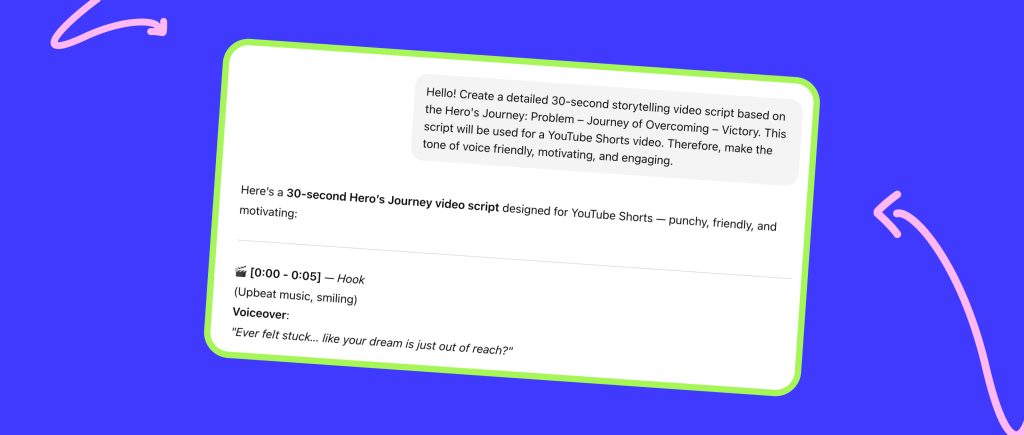
- Hero’s Journey: Problem – Journey of Overcoming – Victory
- Setup – Conflict – Resolution
And many other models, which we discussed in a recent article on storytelling. To gain a deeper understanding of the intricacies of creating engaging video scripts, be sure to read this article.
3. Visual & Audio Generation
It seems that in the past, it was enough to find viral free tracks for YouTube videos to make people want to watch your videos until the end. Nowadays, working with sound for your videos requires a lot of effort. With the help of AI tools, you can improve the sound and introduce new trends (such as how creators made AI assistants a trend in video audio tracks).
What about thumbnails? Can AI help with the visual aspect of your channel? Definitely yes. Not only will it help, but it will also improve the appearance of your visuals. And if you don’t want to spend money on designers, AI tools are quite capable of creating viral YouTube thumbnails.
Here are some tools that can help you to create YouTube Shorts thumbnail and work with the sound:
- Midjourney: The AI tool is known for its ability to generate images based on text descriptions, as well as improving their quality when necessary.
- Runway ML: In addition to working with audio, this tool can replace objects in photos and videos, add animation to images, and generate photos in videos.
- ElevenLabs: An excellent AI tool that was literally created for working with sound. This is where you can create high-quality AI voiceovers, which are so often featured in videos on TikTok and YouTube Shorts.
- Pika: Overall, this tool supports the same functionality, but it can surprise you with an interesting feature: adding camera movements, zooms, and rotations, as well as adding effects to an already animated photo.
- OneOfTen: We’ll call this app universal, even though it’s best known for its fantastic work with thumbnails. In addition to creating eye-catching visuals, you can find graphic design references and even select a suitable royalty-free audio track.
All of the AI tools we have suggested above are literally designed to make your work with visuals and audio easier, as well as to make your content modern and unique which is very important in a highly competitive environment. By the way, we also sometimes use AI voiceovers in our videos. Look how cool it can look in the final result.
4. Editing
A good video also includes high-quality editing. But when aspiring YouTubers look for a selection of editing apps for bloggers, they find it very difficult to figure out all the mechanics. There is a much easier option. AI tools have been around for a long time. They can help make the video editing process faster and easier.
If you want to start editing with AI and add trendy effects that are all over Shorts and Reels, check out our top best editing program for YouTube videos:
- Descript: This tool allows you to replace the audio track using a video script without re-recording fragments; it can automatically add subtitles, and has great built-in screen recording capabilities.
- Opus Clip: With this extension, you can automatically remove unwanted segments, smoothly “glue” video fragments together, and instantly add background music, lowering its volume when you speak.
- Wisecut: A tool that helps you quickly and automatically convert long videos into short videos formatted for TikTok and Shorts. Wisecut can also create a title and description for your video, as well as rearrange horizontal videos into a vertical format without any loss of quality.
As you can see, these tools are useful not only for simplifying the editing process, but also for a quick conversion of one large video into several Shorts, Reels, and TikToks that will draw attention to the full-length video. Some creators underestimate this idea and thus miss out on many benefits and potential views.
5. Publishing & Optimization
The publishing process seems incredibly simple: you upload a video file and click the “publish” button. In reality, there is much more work involved in this step than it seems. The future success of your content depends on the correct and step-by-step preparation of the publication. Furthermore, after publication, you should pay special attention to the optimization and effectiveness of your content. At this stage, AI can also help to facilitate these tasks. Here is a list of tools that we can confidently recommend:
- TubeBuddy: A renowned tool for YouTube content optimization and analytics, equipped with AI. With TubeBuddy, you can automate your posts and select effective titles and descriptions for videos and other types of content.
- Hypefury: An AI assistant designed to work with posts not only on Instagram, but also on X and LinkedIn. It can generate ready-made posts, automatically promote old successful posts, and adapt a single piece of content for different social media.
- Buffer: This program can suggest ideas for posts on Instagram, Facebook, LinkedIn, X, and Pinterest. What’s more, Buffer analyzes when your audience is most active and recommends the best time to post.
What do all these AI tools have in common? The ability to A/B test visual content and thumbnails, generate subtitles/titles/descriptions/posts, and analyze and suggest optimal tags and hashtags.

6. Analytics
The content has been published and optimized, so can you relax now? Not really. It’s time for analytics. We know it can be difficult and tedious. But what if you could make this stage more enjoyable? It’s possible with the help of YouTube channel audit tools and other programs for analyzing content performance. Here is our selection of such “helpers”:
- Vidooly: A tool that analyzes viewership metrics and audience retention and suggests which nuances are hindering video promotion. In addition, Vidooly is equipped with a feature that provides detailed analysis of your audience and competitors.
- Sprinklr AI: An unusual program that collects all mentions of a channel/account/brand, analyzes TOV, and assesses potential reputation. Based on this data, Sprinklr AI can suggest the type of content that will generate a potentially positive response from the audience and viewers.
- YouTube Studio: The most popular extension for auditing and analyzing YouTube channels. There, you can track the ratio of likes, reposts, and comments to views, the hours of activity of your subscribers, and even the viewing time of a particular video.
- GPT-4: Didn’t know that Chat GPT could help with analytics? In fact, even a few links to posts are enough for this tool to draw conclusions about your content metrics in a matter of seconds.
So, these AI systems for content creation and analysis are capable not only of simply counting the number of likes and comments, but also of analyzing reputations and risks when publishing a particular post.
Top AI Tools (with Pros & Cons)
For your convenience and clarity, we have compiled all the proposed tools in a single table. This will allow you to quickly understand all the pros and cons of using AI tools at different stages.
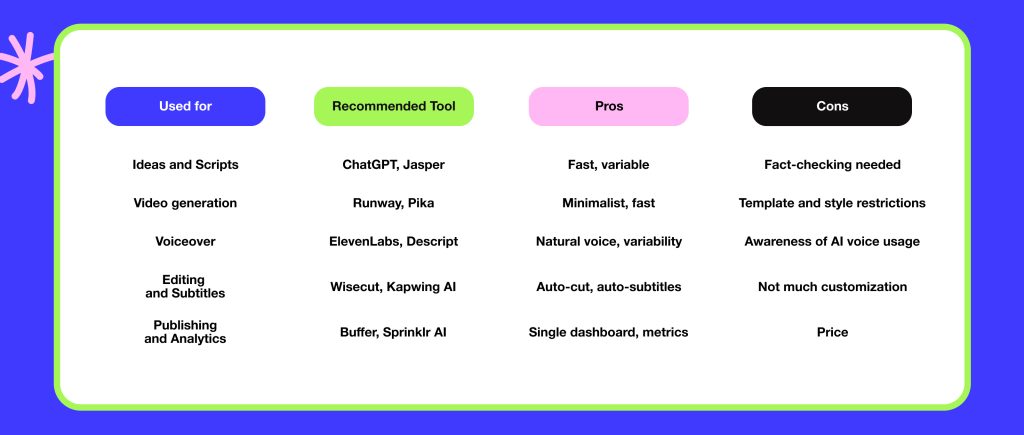
Of course, we are not insisting that you must use AI at every stage. We are simply suggesting something that could potentially speed up production and content optimization. Whether you choose to use these tools or continue doing everything yourself is entirely up to you!
Possible AI nuances and Challenges
As with everything, excessive use of AI tools has its nuances and consequences. Not all content created using AI can be trusted. In response to the rise in mass production of low-quality content using AI, YouTube has tightened its monetization policy, leading to the mass demonetization of channels that use synthetic, repetitive, or misleading videos. How can you use AI now without getting your channel blocked? We will discuss the most common ones in this part of the article.
Deepfakes: How Not to Cross the Line
It is not uncommon for creators to ask how to start a faceless YouTube channel, and they resort to the idea of creating AI animation. We agree: this can indeed be interesting and entertaining. However, it is always possible to cross the line. Some users create videos featuring popular personalities and celebrities, which can mislead viewers. Some do it as a joke, while others do it deliberately to damage the star’s reputation. We believe that it is not worth taking such a risk for the sake of quick fame and increased video views, as it is illegal.
Copyright and Licenses for AI-Created Assets
Another common problem faced by creators who use AI to generate video clips. It is important to remember that AI can create videos based on existing content. And if that content is copyrighted (which is most likely the case), the creator may receive a complaint and subsequent social media ban for such a creative decision. In this regard, it is important not to cross the line and always check the resulting content for copyright. This will protect your creativity and help you avoid unpleasant situations involving the removal of your content.
Transparency: Should You Disclose That Content is Generated by AI?
Surprisingly, not all creators admit that their content was created using AI tools. We don’t really understand the reasons and motives behind this, but we still want to assure you that at this point, it is necessary to indicate that the fragments were generated by AI. This is not only honest, but also correct from a legal standpoint. Although many social media automatically label content as “AI-generated,” we recommend repeating this information for the sake of honesty with users and the security of your creative property.
Lack of Audience Trust in AI Content
This point literally follows on from the previous one. How to stay on top using AI and not lose the trust of your audience? Our answer is simple: be sure to mention that you are using AI. Whether it’s a fragment or a whole long video, don’t hide this fact. The most important thing for a creator is to be honest with their audience. Of course, not every viewer will support the use of AI in content due to skepticism about new technologies. In our opinion, honesty is the best policy. Trust us: many will support you in using AI, as it brings novelty to your content. On the other hand, if you hide or completely deny the use of AI to create content, it will reduce user trust in you. Is this secrecy worth the loss of your viewers’ loyalty? We don’t think so.
Final Thoughts: The Future of AI-Created Content
AI has already become a convenient tool for creators to modernize content. Moreover, we are convinced that major changes are still ahead, as AI is developing its functionality literally every month. Nevertheless, it is important to remember that the “human factor” is still critical. Why? Because people are interested in “real people,” their stories, emotions, and experiences behind the screen. It is not worth handing over the creative process entirely to AI. It is still necessary to keep some of the work on content for yourself to ensure the uniqueness and liveliness of what you publish on social media.
We believe that in 2026, AI video modernization will become even more commonplace. More and more creators will automatically convert long videos into Shorts, Reels, or TikTok to attract organic traffic to social media. With personalized AI training, creators will be able to optimize the editing process and create a personal “assistant” for their content. Of course, we cannot know the outcome of such rapid AI development. We can only recommend using AI for script generation, precise editing and retouching, as well as content performance analysis. What does the future hold for AI in content creation? We will soon see it together.